Add more functionality and improve Tags

TAGS - seriously, PLEASE, we need you to fix this “feature” - at present the functionality for tags is extremly flawed; and using it becomes counter productive, which renders the feature virtually useless. One of the issues plaguing me is auto-tagging, the software has automatically tagging some of the fonts - the majority of the tags generated are either wrong, duplicative or not desired. For example - here’s some of the duplicative tags - “hand, handlettered, handwriting, handwritten”

ADD, FIX OR REMOVE

need option to enable user option to toggle on/off “automatic tagging” thus allow disabling of system generated tags for fonts (or remove system auto-tagging).

need ability to edit ALL tags including those auto-generated - including abiilty to remove ANY/ALL tags from ANY/ALL fonts, ability to rename ANY/ALL tags, and ability to delete ANY/ALL tags.

NOTE: ability to (simply) rename and/or delete ANY tag - Presently any custom tags you create can not be easily renamed and/or deleted - if you want to change or remove a tag you have first remove the tag from every font using the tag.

LASTLY AND MOST IMPORTANTLY - currently users must to create new tags (retyping the same word) every time. Please add function which allows ability to select from a drop down or list that displays all existing tags allowing you to select any (one or multiple) of the desired tag(s).

11 Likes

Hello @multitaskingmaven, thank you for your post and welcome to the forum :pray:
And thank you for all the suggestions laid out in so much detail :pray:
I’ve changed the post header to better reflect the post being in the Greenlight category, hopefully with enough attention from the community this will be added to one of the future FontBase updates.
Thank you again,
Yuriy
FontBase Dev Team

1 Like

Yeah I agree that tags need a serious improvement. Right now they are pretty much useless for me. For the moment I manage myself separating fonts by folder in Windows, but it’s limited to a “one dimensional” categorization.

For example, a DISPLAY typeface that’s also a SANS SERIF typeface. With my current sorting system on Windows Explorer folders I can either save it in my DISPLAY or SANS SERIF folder, but not both of them at the same time.

Here’s when Tags come to the rescue… or they would if they weren’t broken.


ISSUE 1: To delete a Tag you need to search the fonts and delete the tags associated in those fonts.

SOLUTION: Creating a way to delete the tags directly from the tags dropdown.


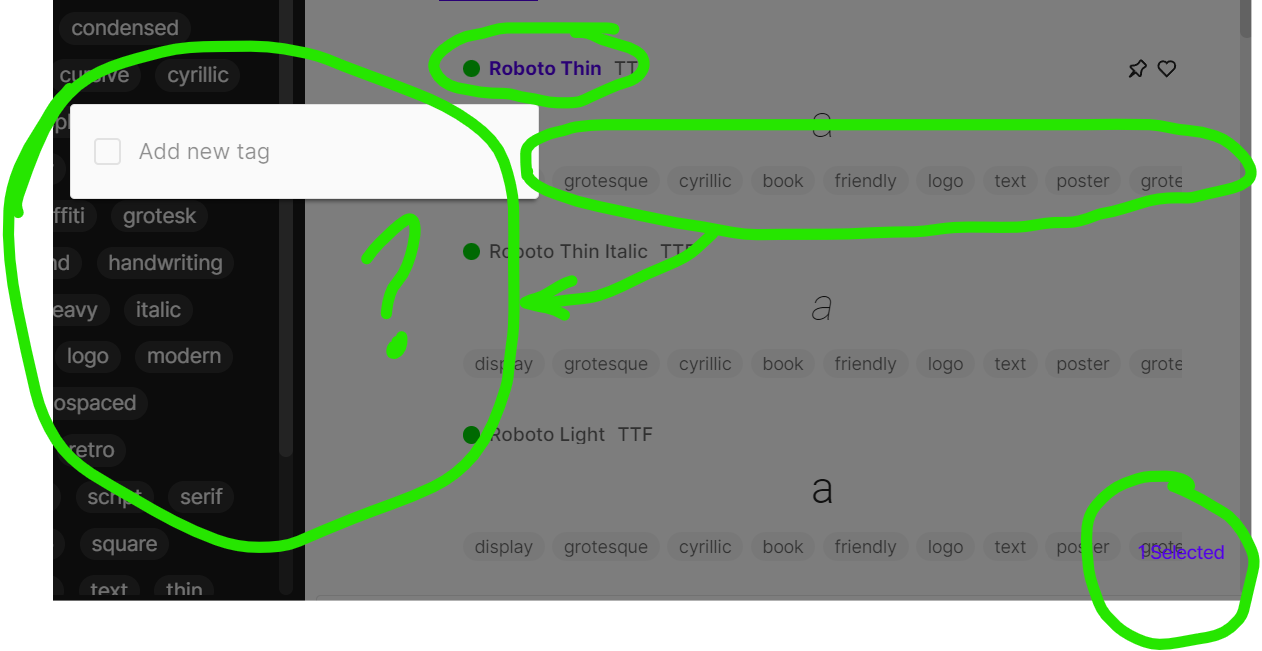
ISSUE 2: You can’t delete tags on certain fonts. For example, I have a Roboto version that it’s filled with tags but if I want to edit them I can only add new tags. The ones that are already there don’t appear in the tags list when trying to edit them.


ISSUE 3: When selecting a Tag in the tags list all of the tags appear as if they were available, only for most times to click those tags resulting that there are no fonts with those two tags associated with.

SOLUTION: Making it so if I click a tag it only shows the ones that are available. For example, if I click the tag BOLD currently it shows tags like WIDE, NARROW, SERIF, HANDRWITTEN, ALL CAPS… etc. But only the tag WIDE and NARROW has an available font. It should be if I click the tag BOLD it should only show me WIDE and NARROW tags.


ISSUE 4: Having to rewrite every tag I want to add to a new font it’s just a kick to productivity.

SOLUTION: Display a list of all created tags, plus a search bar, most used tags listed first, etc. Instead of just a “Add new tag” window.


ISSUE 5: Autotaging becomes irrelevant quickly. There are so many categorizations I don’t want to use and don’t add up to my workflow. Combined with all previous issues it becomes a nuisance rather than a feature.

SOLUTION: Being able to enable / disable that feature in the Settings.


ISSUE 6: The Tags dropdown can get crowded pretty quickly. Having to scroll through so many tags isn’t really great.

SOLUTION: Adding a search bar in between the “TAGS” dropdown bar and the tags would be it.


I don’t really think we should wait for community approval for this. It’s a paid feature! It should be enticing for users and provide actual value, if not users will stop paying eventually. I actually stopped paying a few months ago because I couldn’t find value in the tags and supersearch feature. Mainly because of the Tags feature.

6 Likes

Hello @crisalarconworks, thank you for the post :pray:
And a separate thank you for all the suggestions you’ve explained in such detail, as well as sharing your personal opinion as to which direction FontBase development should head in and the process of deciding which features should be worked on first :pray:
Thank you again,
Yuriy
FontBase Dev Team

My pleasure, but can we have some kind of confirmation (or disapproval) about this?

Thank you for the quick reply @crisalarconworks :pray:
What do you mean by “confirmation (or disapproval)”?

In your previous answer you don’t address if it’s something it will be worked. I understand community approval for things that are outside of what FontBase already can offer, but waiting for community approval to fix a premium feature it’s kind of a weird business practice in my opinion.

If its something that won’t be worked on I guess I’ll stay in the free plan.

Thank you for the clarification @crisalarconworks :pray:
I did answer in one of the previous messages, here:

And thank you for voicing your opinion, it helps us understand what the users are looking for, what they like and what they miss, and ultimately help us make FontBase better with every change :pray:
Just to clarify - “fixing” is not exactly the most correct word here. The feature could use improvement, as several users have suggested in the past, and most suggestions, including yours, make a lot of sense. But it’s not a bug or a mistake per se.
And a separate thank you for expressing your view on our business practices :pray: I do understand you feel strongly about the tags functionality and it is a make-or-break feature for you, but I’m afraid we cannot adjust our whole development process around the priorities you personally see as being the most important ones :pensive:
As for “If its something that won’t be worked” - I have provided all the information that I could :slight_smile: Never implied that this feature would not be worked on, not in the slightest, but of course you free to decide if and how to use FontBase while the upgrade of the Tags feature is still not implemented :pray:
Thank you,
Yuriy

Yes! The #1 reason I purchased FontBase was for the tagging features. Major letdown so far.

Where is the file where the tags-font associations are stored? I can find the JSON file where the collections I created are, but not the tags.

I would like to be able to add all the tags from Google Fonts, as their are available on the API and git, but don’t seem the be added on FontBase.

1 Like

Hello @jeremygf, thank you for your post and welcome to the forum :pray:
Such a file does not exist separately, but it sounds like a good idea to have it separately for import/export purposes :pray:

Thank you again,
Yuriy
FontBase Dev Team

1 Like

I came to the forum even creating my account for this specific topic and reason and found other posts with 30 Likes and interaction. I think the demand is there. I really hope it gets worked on as I would greatly use and appreciate the feature :slight_smile:

1 Like

Couldn’t agree more. I would suggest the following:

Also agree with @multitaskingmaven that a function to remove all tags everywhere would be a great option as each user wants to have their own system not have a system forced upon them. By all means add a ‘smart’ tagging but allow us to remove all of it in one click or easily remove and add tags at whim in multiple cases easily as shown in the visual attached (wouldn’t allow me to attach image?!).

Hello everyone:)
Glad to announce that the 2.22.4 update is here and, among other things, finally includes the option to disable system and crowd tags (using the toggles in the Settings page) :partying_face:
Also, only available tags are shown in the quick search now, i.e. if you see a tag in the SuperSearch sidebar then there is at least 1 font in your currently selected Collection/Folder that has it.
This option has been missing for a long time, sorry for such a delay :pensive:

Thank you :pray:

2 Likes

Awesome, this is a step in the right direction. Seeing the available tags as you narrow your selection it’s a huge QoL update, it was in desperate need. Disabling system and crowd tags makes things infinitely better for me, now I can add the same tags but to the fonts I want to.

Although I still think we need some kind of search bar when adding the tag. The horizontal scroll bar can get super long by how many tags are out there. I’ve accidentally created two tags that were meant for the same category but I mistyped it.

And I got a new Idea. Adding “serif” to all my fonts in my Serif folder it’s going to be painful. Is it possible that we could add tags by also right clicking the folders name in the “Folder” dropdown? Maybe even being able to delete the tag that repeats through that entire folder as well by also right clicking on it.

Anyways, the tag function has been seriously improved that now it has become way more practical than in used to. But there is room for improvement, to make it as amazing as FontBase is to font managers for Windows.

1 Like

I’m a long-time free user, currently looking into the Awesome features. I created a forum account just to like :heart: this post.

Some folks were pretty detailed about their concerns with the tagging features… I’m surprised there wasn’t more applause when improvements came.

It’s good to hear there’s been progress, and I look forward to trying out Awesome.

1 Like

Hey Yuriy,

a good idea indeed, and much needed as well.
I’m in a situation where syncthing ruined the FontBase folders on two systems.
Had to rebuild the directories, clean the inherited and newly created mess on both and then twice re-add the most, immediately needed, essential tags. But all the refined tagging has to be done twice as well, that’s a tedious task as you probably can imagine. For some reason I’d rather not use syncthing for these tasks :wink:

Is there some status update on this by now?

@boototter Hello David, sorry to hear about all the troubles you had to go through :pensive_face: Unfortunately there is no new information on the timeline for syncing tags that I can provide at the moment :pensive_face: