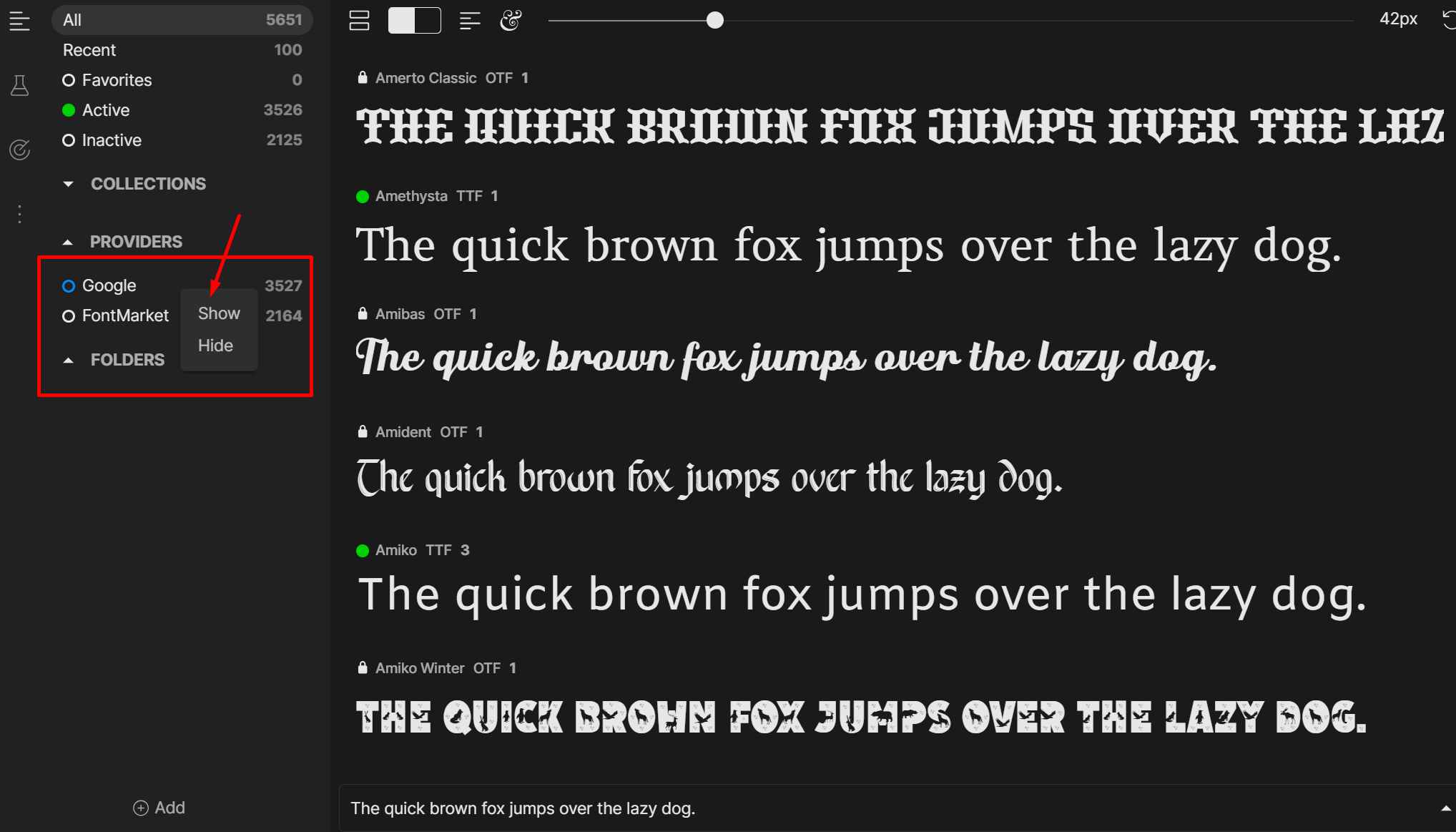
Hello Serhii, thank you for your post and welcome back
This is by design as of v2.24.4, not really a bug. I’m afraid currently there is no way to remove either provider from the sidebar, at least for now.
Good evening. I see. What should I do if I want to activate the font of the required version from my specific folder, but Fontbase keeps activating the font from the Google folder? I want to forcefully disable this feature…
Thank you for the quick reply Serhii
This can be done by opening the font’s Family page - you will see a list of fonts from this family as well as specific instances of the font if there happen to be more than one in FontBase. Just click the activation toggle circle of the one in the folder you need (the file path, including the folder, will be displayed above the preview text).
That’s understandable. I’m referring to a different situation. Auto-activation plugins activate fonts at their discretion, taking them from the Google folder. But I need the plugins to search for fonts in my personal library first. That’s why I need to be able to exclude the Google provider folder. Very often, it’s a complete mess with font versions in Google folder. This causes enormous inconvenience in my work. Thank you.
Thank you for the quick reply
Oh, now I understand, thank you for explaining the situation. Then “Hide” + removing any font files in the Providers/Google folder is the way to go in your case.
Pre-loaded Google fonts will disappear and FontBase will only have access to any Google fonts you have in other folders.