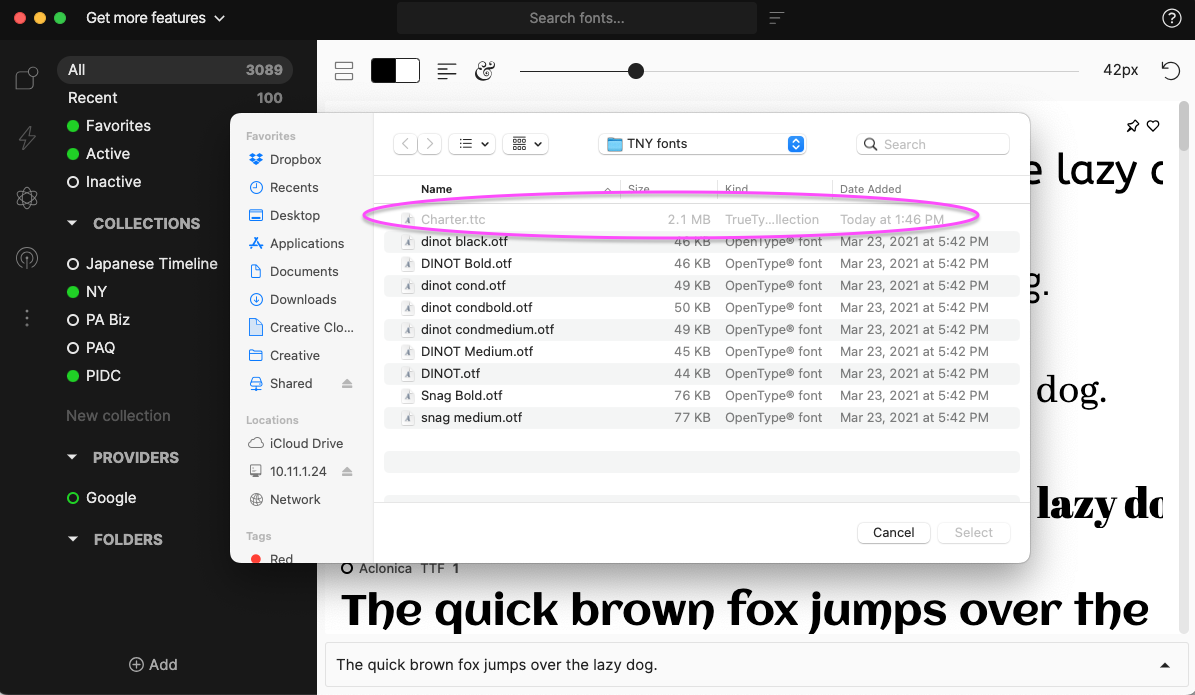
I just installed the Font base, and for some reason, I can’t get it to import any of my fonts. I cleared all the fonts that are not system fonts out of the systems font folder using Font Book. Then I tried to import them directly into Fontbase from a separate folder (not the system folder), and they are all grayed out and won’t import. I tried dragging and dropping the fonts onto Fontbase, but it did nothing.
Could you please provide some direction on this issue?
Hello @Luis832, thank you for the post and welcome to the forum
What do you mean by “grayed out”? Would it be possible for you to attach a screenshot?
Also, are the fonts located on a local or a cloud drive?
Thank you again,
Yuriy
FontBase Dev Team
Hey! It sounds like this might be an operating system or Font Book issue, not a Fontbase issue. What’s your OS? I can’t speak to macs specifically, but if you’re on Windows and have the option to view hidden files checked, the hidden files can appear as grey. My guess would be that Fontbase can’t access hidden files (if you uncheck the option under the View menu, they will go away).
Hello @PIDC, thank you for the post and welcome to the forum
And a separate thank you for the screenshot, it all makes sense now.
It seems the font in question is not a single font, but a font collection, i.e. a font file with a .TTC extension.
As of now FontBase only supports .OTF and .TTF font file formats (Supported Font Formats — FontBase Tutorials).
Thank you again,
Yuriy
FontBase Dev Team