I’ve been experiencing an annoying issue using FontBase in Photoshop. After closing Photoshop, the crash report windows from Adobe always pop up and only go away if I don’t open FontBase.
I always keep the system, driver, apps, etc up-to-date.
I would like to know if anyone else has experienced this issue, and if you do, I wonder if you have a solution beside stop using FontBase at all :sweat_smile.
Thanks in advance!
My Specs
Photoshop CC 2024
GPU Nvidia RTX 3060
AMD Ryzen 9 5900HX
Windows 11 Home 23H2
FontBase 2.20.7[crash report_Fontawesome.txt"]
Ps >> I’m sharing the crash report .txt file if that helps in someway
Hello @Irving, thank you for your post and welcome to the forum
To better understand what’s going on - are you using regular activation, or auto-activation in this case?
Thank you again,
Yuriy
FontBase Dev Team
Thank you for such a quick reply
Sorry for so many additional questions, but they really help in eliminating options as to the probably cause of the issue.
If I may, a few more:
If you activate 1 font in FontBase that is not used in your currently open Photoshop project, does this issue still occur?
Are any of the fonts activated in FontBase also in your Windows system fonts? I.e. fonts active permanently even with FontBase closed.
If FontBase plugins are present in your Photoshop’s Plug-Ins folder, could you please try to remove them from the Plug-Ins folder and see if the issue still occurs?
1. If you activate 1 font in FontBase that is not used in your currently open Photoshop project, does this issue still occur? >> No, the issue does not happen in this scenario.
2. Are any of the fonts activated in FontBase also in your Windows system fonts? I.e. fonts active permanently even with FontBase closed. >> No, I don’t have Windows System fonts activated permanently that are also activated in FontBase
If FontBase plugins are present in your Photoshop’s Plug-Ins folder, could you please try to remove them from the Plug-Ins folder and see if the issue still occurs? >>> If I remove it from the Plugin-Ins folder the issue does not happen.
Issue happens in the following scenario:
Photoshop project using a font family from Adobe Fonts service. (font family not present in FontBase)
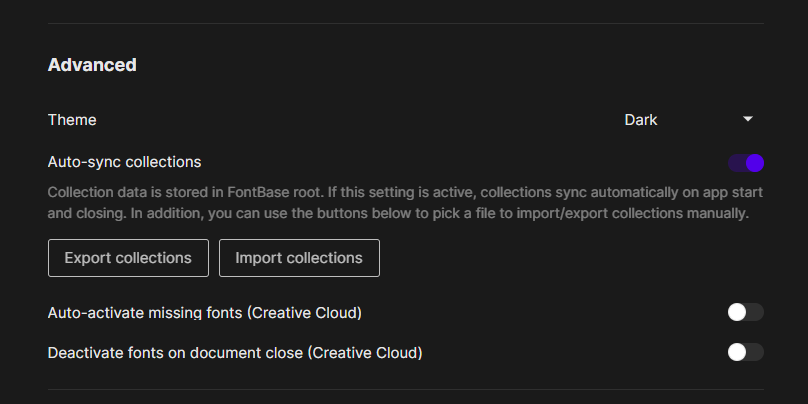
FontBase open with Auto-activate missing fonts (Creative Cloud) enabled or disabled (either way it happens)
The issue stops if I disable the Auto-activate missing fonts (Creative Cloud) in FontBase, disable Adobe Fonts Service from the Creative Cloud App, and stop all relative Adobe service processes from the Task Manager. Doing all these, the issue stops.
I can use FontBase with no issue in Photoshop with any other font that is not related to Adobe Font Service. This means that I have to avoid enabling Adobe Font services while using FontBase, only then the crash report windows stop showing up everything I close Photoshop.
I think the issue is related to the Adobe Font Service or any other Adobe Process that gets active while using Adobe Font Service.
Thank you for such a quick reply and such much additional info
Indeed it does sound like something’s up with the Adobe Font Service given the data you’ve provided, for better or worse
I wonder if FontBase auto-activation would still trigger the effect without the Adobe Font Service? Have you perhaps tried this combination already?
If I keep auto-activation without any Adobe font services or process related, the issue does not happen but I have to avoid opening a file in PSD or any other file/app that would trigger Adobe fonts services.
Yes, that is too bad. I know Adobe tends to complicate things with every update. I hope at some point the issue gets resolved, in the meantime, I’ll use it as it is because I really like FontBase, and I really appreciate the work you do


 I hope at some point the issue gets resolved, in the meantime, I’ll use it as it is because I really like FontBase, and I really appreciate the work you do